Saturday, 3 February 2018

Why TortoiseGit is so amazing

I had been using Git for a very long time and this is the best version control system that I ever used. In the past, I used centralized version control system: CVS, SVN, Visual SourceSafe, and TFS.  I heavily use TortoiseGit and I use git bash only if the feature isn't there on TortoiseGit . I also develop in Linux and I used Samba share drive or VirtualBox network share to be able to access my source code outside of Linux, so that I could use TortoiseGit on my codes.

Here is how Git changed my development style and quality of my code:
  • Personal code review before committing - In TortoiseGit, it is very easy to see the diff of your current code change and the last commit via the included UI diff tool (I also use an external tool called WinMerge which is more faster). This diff will direct me to the exact place where I did my modification and this gives me a chance to have a second look if I accidentally forget or misplace something like reverting some debug compilation symbols that shouldn't be on production release.

    I noticed that git bash users (at least from the people that I know of) never do personal code reviews before committing and I think it is because it is not very straightforward to do so like in Tortoisegit. There was a project in my previous company where the developer unintentionally added a code which made the software release very unstable. They found out that some test snippets were included on the commit. A quick review of the software before commit will save tons of headaches.
  • Stash - I love this feature. This helps me move through different git branches without committing my modified file and instead stash saving it and popping it out if I need to continue working on the modified files.
  • Reviewing codes from other committers - It is very easy to review code from other committers via git log compare revision on TortoiseGit. This helps me review other developers work.
  • Revert on TortoiseGit - whenever I do code review, and if I see that some of the codes needs to go back to its original state, I can just simple do a revert on the commit windows dialog box of TortoiseGit. 
  • Very easy to merge codes
  • Bisect - I used this only once. But bisect feature is very impressive.
  • Distributed- being distributed is a very very very very very good thing. I commit often and sometimes, I don't have an internet connection. With this, I can commit anytime and once I have an internet connection, then that's the time I can push to the git server.

These are the things that I really like  in TortoiseGit which I had been using for many years. It is very simple and yet powerful.

Friday, 20 October 2017

Android Voice Controlled Servo Motor Controller : IOT Version using ESP8266


Last week, I created a Voice Controlled Servo Controller using Bluetooth HC-05. This week, I created an IOT version of the Voice Controlled Servo Controller.

Used Strategy Design Pattern (both on Python and C++) to achieve flexibility to switch between the Bluetooth module and ESP8266 module.

Sunday, 15 October 2017

Android Voice Controller Servo Motor Controller using Bluetooth


This is a voice controlled servo motor controller. I created this just for fun. I used the following:
Arduino Mega
Arduino IDE C/C++
Android Speech to Text
Bluetooth to Serial using Serial Port Profile
Python SL4A
Servo Motor 

Saturday, 7 October 2017

Embedded Linux: Buildroot and BeagleBone

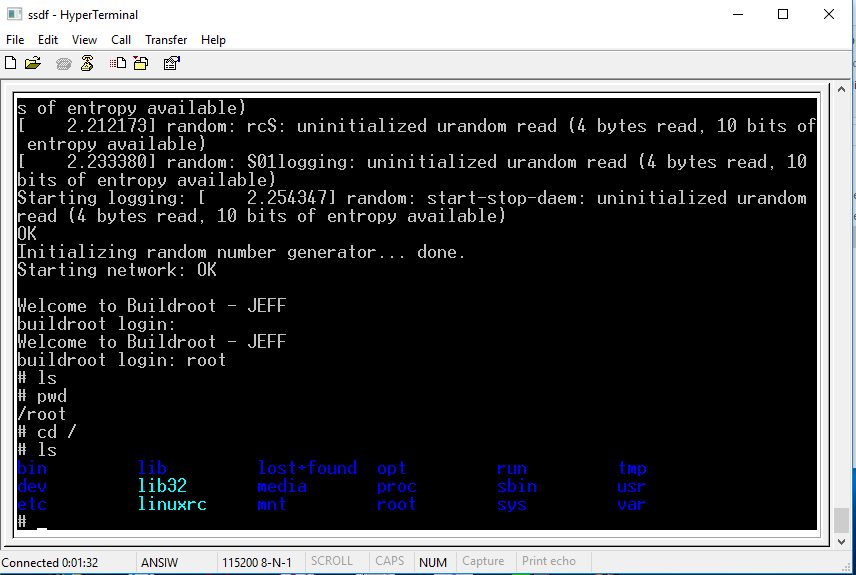
Buildroot for BeagleBone Black - Hyperterminal @ 115200bps
I just created a custom embedded linux platform using Buildroot for my Beaglebone Black. Buildroot is very easy to use. I was able to create my Embedded Linux image within 1 hour (including the Buildroot compilation).

I posted the whole procedure on my youtube: https://www.youtube.com/watch?v=QLzGKIx9Mz8

I used LUBuntu because it is more lightweight compared to the main Ubuntu distribution.

Monday, 2 October 2017

Test Driving: nRF24L01 + my observations vs CC1101


I am currently trying the nRF24L01 and it is very easy to use. In as little as 30 minutes I was able to make the two modules communicate with each other.  I had just started playing with it since yesterday and one thing that I am looking for is an RSSI readout. Unfortunately, this only has a boolean return value for the Received Power (RPD). If received power levels are more than -64dBm, you will get a 1, less than that, you will get 0. In CC1101, I can get the absolute value of the RSSI and convert it to dBm accurately.

I used the steps on this link to setup my nRF24L01.

Sunday, 3 September 2017

Vicks Humidifier Modification: Adding a Humidity Controller with Hysteresis

One winter night, I woke up and my room was very foggy. I checked my Sunbeam humidity monitor and the humidity is around 80! I immediately turned off my Vicks humidifer (which I bought from Walmart). We all know that molds are the number 1 enemy in a very humid room. Since now, it is summer, I was able to do some modification and a bit of reverse engineering.

First, I opened the Vicks Humidifier and checked all the circuit inside and I did my first prototype and sensor characterization on an Arduino Mega 2560.

Unmodified circuit


Arduino Mega Prototype with DHT-11


Next,

Next, I modified a couple of things inside the Vicks humidifier. I only have 24V DC on the board and I planned on using an Arduino Mini. I checked Arduino Mini's schematic and it uses MIC5205 regulator. From MIC5205's datasheet, normal operation for Vin is from 2.5V to 16V. Since I don't have any regulator in my hand, I just created a 12V power supply using P2N2222A in emitter follower configuration with voltage divider in it. I used this 12V to power my Arduino Mini.

Next, the float switch needs to connect 24V to certain part of a circuit. I modified this and since I don't like to use a relay in this scenario and I want this be have a lower power consumption, I created a PNP/NPN combo to deliver the needed 24V on a part of Vick's circuit and this triggers the ultrasonic mist generator and the internal fan.

Almost Complete


Now it is working. I implemented a hysteresis from 50% to 60% of humidity.

Arduino Mini Mounted


I removed the scent filter since I think it is not that useful and it just consumes additional power. The DHT-11 humidity sensor goes out via the scent filter.